Apps / ERPNext / Inventory

Inventory
Stock across every warehouse, in real time
Track quantity, batch, serial number, and expiry across unlimited warehouses. Reorder levels, stock transfers, and valuation update the moment a transaction happens — no end-of-day reconciliation.
No credit card required
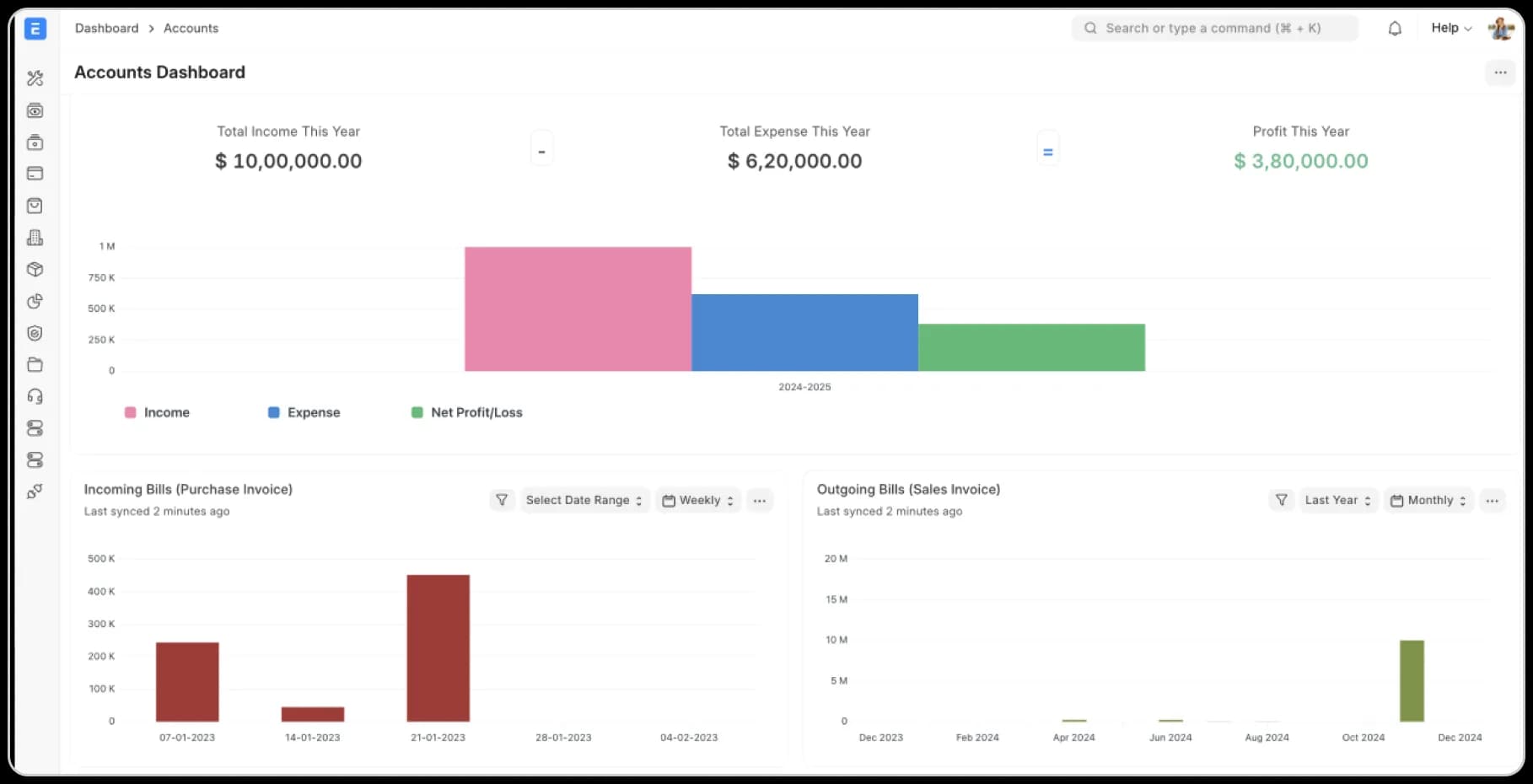
[01] What it does
Everything Inventory handles
Multi-warehouse tracking
Unlimited locations, real-time quantity and valuation.
Batch & serial tracking
Full traceability from receipt to sale, including expiry dates.
Automated reorder levels
Get flagged before you run out, based on historical velocity.
Stock transfers & reconciliation
Move stock between warehouses with a full audit trail.
Stock valuation methods
FIFO, moving average, or standard costing — your choice, applied consistently.
Barcode & QR scanning
Receive, pick, and count stock with a scanner instead of a manual count sheet.
Cycle counting
Schedule partial stock counts without shutting down the warehouse.
Landed cost tracking
Freight, duty, and handling costs allocate into your stock valuation automatically.
Low-stock & expiry alerts
Get flagged before a stock-out or an expiring batch becomes a write-off.
[02] Who it's for
What changes when you switch
Stock across every location, one view
Retailers and distributors managing stock across multiple locations get one live view instead of a spreadsheet stitching it together.
Full batch and expiry traceability
Food and pharma businesses trace every batch from receipt to sale, expiry included.
[03] Compare
See how Inventory stacks up
Toggle between tools to compare feature by feature.
Onebook
RecommendedReal-time accuracy
Updates the instant a transaction posts
Multi-warehouse consolidation
Native, one view across all locations
Reorder alerts
Automatic, based on velocity
Audit trail
Every transfer and adjustment logged
Spreadsheets
Real-time accuracy
Manual updates, always slightly stale
Multi-warehouse consolidation
Separate tabs or files per location
Reorder alerts
Manual review required
Audit trail
No built-in history
[04] Integrations
ERPNext works with tools you use
Connect to the tools your team already relies on: CRMs, payment providers, analytics platforms, data warehouses & more. We keep everything in sync — automated, accurate, and always up to date.




[05] Implementation
GO LIVE ON INVENTORY IN 8–12 WEEKS
Most implementations fail on scope creep and bad data. We use process mining to catch failures before they happen.

Week
1–2
Process mining reveals reality
We mine your current systems: Tally, spreadsheets, emails to see how work actually flows. You get data on where things break, where people create workarounds, and where time disappears.
Deliverable: Process map showing your actual workflows
Week
2–3
Lock the scope in writing
Week
4–8
Configure, test, and train in parallel
Week
9–12
Go Live with continuous monitoring
Modules
Other ERPNext modules
[10] FAQ
QUESTIONS?
WE'VE GOT ANSWERS.
Everything You Need To Know About Onebook As A Business
For Partners
01.
I'm currently on Tally/Zoho. Will switching disrupt my finance team?
No. We support Embedded Accounting. Your operations team gets a unified ERP for inventory, production, and CRM, while your accountant can continue using the Tally format they love via our optional Tally Format data export. You get operational control; they get compliance comfort.
02.
Is my data secure on an Open Source platform?
Yes. Onebook runs on managed Azure Kubernetes with SOC 2, ISO 27001, GDPR, and HIPAA compliance. Your data is encrypted at rest and in transit, with role-based access controls and regular security audits.
03.
How long does it take to go live?
Most companies go live in 8–12 weeks. We scope the project upfront, migrate your data cleanly, train your team properly, and run process mining after launch to catch issues early.
04.
Why don't you charge per user like Zoho or SAP?
Per-user pricing is a tax on growth. When your warehouse team needs access, you shouldn't have to calculate ROI per login. Onebook charges by tier, not by headcount — so your whole team can use it.
05.
Can I keep using Tally for accounting?
Absolutely. Our native 2-Way Tally Sync lets your accountant stay on Tally while your operations team runs on Onebook. No double data entry, no disruption.
06.
What if it doesn't work for us?
We offer a free consultation and a lifetime warranty. If Onebook doesn't fit your business after implementation, we'll help you migrate back — no lock-in, no penalties.